It was never a willpower problem.
Less screen time, together.
A free app blocker you use with friends. Make a pledge. It starts when enough of you are in.


On a computer? Scan to get it on your phone.
- Free. No ads.
- iPhone and Android™, one pledge
- Friends never see your screen time



How it works
Pick the apps that eat your day.
Social media, short video, games. Your list stays on your phone.
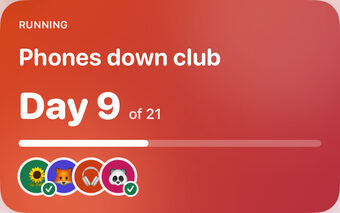
Start a pledge, or join a friend's.
Choose the minutes a day and how many days. Your limits switch on the moment you're in.
It starts when enough of you are in.
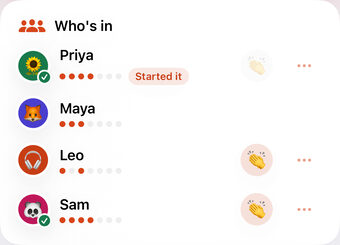
Then check in, cheer each other on, and finish together.
Going solo? Pick Just me and it starts straight away.
Your feed can wait.
Open a blocked app and you get a pause, not the feed.
- Go back to your day with one tap.
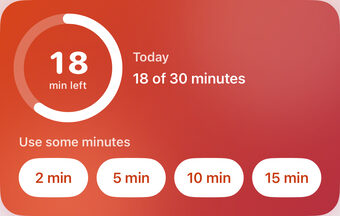
- Or use a few minutes from today's budget: 2, 5, 10 or 15.
- A heads-up comes 2 minutes and 1 minute before they end.
- Each pause suggests something better to do.
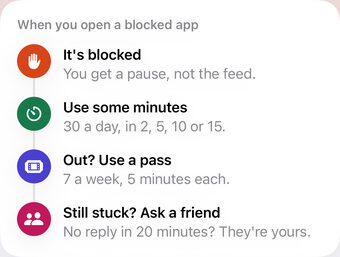


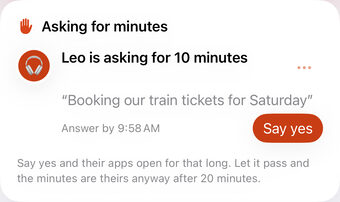
Out of minutes? Ask a friend.
No reply in 20 minutes? They're yours.
- Spent today's minutes? You have 7 emergency passes a week, 5 minutes each.
- Once your pledge has started, ask your friends for 5 to 30 more minutes, twice a day.
- A friend can say yes or no straight from the notification.
- If nobody answers in 20 minutes, the minutes are yours. Nobody is held hostage.
Used everything? The apps stay shut until midnight, when your minutes come back. Passes come back on Monday.


Changing your mind takes a day.
Leave a pledge or drop an app, and your limits stay on for up to 24 hours. Adding an app is instant.
- Leave whenever you like. Your limits stay on for up to 24 hours, or until the pledge ends if that's sooner.
- Removing an app waits 24 hours. Adding one is instant.
- No new pledge during the wait, so a looser one can't slip in.
- If someone leaves, everyone in the pledge hears.


Celebrate the finish.
Make the pledge with friends, so you're not doing it alone.
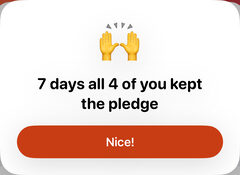
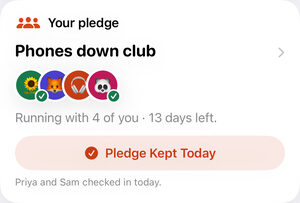
- Tap Pledge Kept Today, and see who else did.
- Send a cheer. It's just between you and the friend you cheer.
- Celebrate the days you're all in.
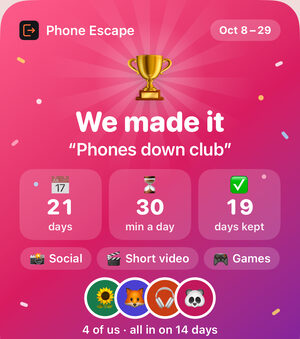
- Finish together and share your We made it card. Badges go on your trophy shelf.
- Want more? Go another round.
No feed. No leaderboard. Nobody's ranked.

Friends never see your screen time.
Your screen time never leaves your phone. Not to us, and not to your friends.
Friends see
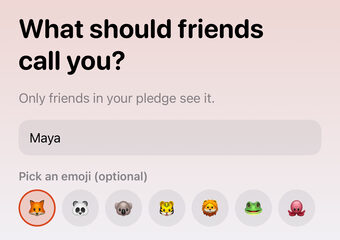
- Your first name and your emoji
- The days you check in
- When you ask for minutes, your note, and who said yes
- When you join, leave or delete the app
- A note if nothing is shielded on your phone
- Anything you write, like the pledge's name or a note
Never
- Your screen time
- Which apps you block
- How long you spent on anything
- When you use your minutes or a pass
- Everyone in a pledge shares its terms: the minutes a day, the days and the topics.
- A cheer is just between you and the friend you cheer.
- No ads, and the app never tracks you. Delete your data any time from Settings in the app.


Phones and price
iPhone or Android, you're in the same pledge.
Friends on different phones join the same pledge. Works on iPhone and Android phones.
Free for you and every friend in your pledge.
No ads. No subscription. Nothing to buy, not even a way out.
What a pledge adds
Why not just use Screen Time? It's good at setting limits. On iPhone, Phone Escape uses it to block the apps you pick, with your permission. Here's what a pledge adds.
Nobody stops alone.
Your pledge starts when enough friends are in. Then you cut back together.
Changing your mind takes a day.
Leave a pledge or drop an app, and your limits stay on for up to 24 hours.
More time costs something.
You get 7 passes a week, and in a running pledge, 2 asks a day. Your pledge sees each ask.
A friend can say yes or no. No answer in 20 minutes? The minutes are yours.
Your friends can have Android.
Screen Time stays on Apple devices. A pledge works on iPhone and Android.
Screen Time still does things we don't, like schedules and detailed reports. With a passcode someone else holds, it can also be a harder lock.
On Android? The same goes for Digital Wellbeing, and your friends can have iPhone.
Built on what research says people stick with.
-
Firm limits
In a 12-week study of about 2,000 adults, daily limits that couldn't be lifted on the spot cut time on social apps by about 22 minutes a day.
-
Checking in
Across 138 studies, keeping track of progress helped people reach their goals, more so when others could see it.
Psychological Bulletin, 2016 · 138 studies of many kinds of goals
-
An easy way out
In a study of pause screens, simply offering “don't open” did more than a message or a wait.
-
A little slack
Research on goals finds an emergency reserve helps people keep going, partly because nobody wants to spend it.
These studies are about the ideas Phone Escape is built on. None of them tested Phone Escape.
Questions.
Why not just use Screen Time?
Screen Time is good at setting limits, and on iPhone, Phone Escape uses it to block the apps you pick. What it adds is people: a pledge with friends that starts when enough of you are in, and takes a day to undo. Friends on Android can join too. Screen Time still does things we don't, like schedules and detailed reports.
Do my friends need the same phone?
No. Friends on iPhone and Android can be in the same pledge. You need an iPhone with iOS 26 or later, or a phone with Android 10 or later.
Is it really free?
Yes. Phone Escape is free for you and every friend in your pledge. No ads, no subscription, nothing to buy. It works best when friends can join without paying.
What can my friends see?
Your first name, your emoji and the days you check in. They also see when you ask for minutes, your note and who said yes; when you join, leave or delete the app; a note if nothing is shielded on your phone; and anything you write, like the pledge's name. Never your screen time, never which apps you block, and never when you use your minutes or a pass. A cheer is just between you and the friend you cheer.
What if I run out of minutes?
You have 7 emergency passes a week, 5 minutes each. Once your pledge has started, you can also ask your friends for more, twice a day. A friend can say yes or no, and if nobody answers in 20 minutes, the minutes are yours. When it's all used up, the apps stay shut until midnight.
Can I do it on my own?
Yes. Pick Just me and your pledge starts straight away. You get your daily minutes and the passes. Asking for more needs a friend in your pledge.
Can I still switch it off?
Yes. Your phone's settings can always turn blocking off, and deleting the app removes its limits. The ways out inside the app are the ones that wait a day.
What happens if I leave a pledge?
Your limits stay on for up to 24 hours, or until the pledge ends if that's sooner. Your friends are told you left. You can't start or join another pledge during the wait. Started a pledge for friends by mistake? Until someone joins, you can delete it with no wait in its first 10 minutes.
Will it block calls, messages or apps I need?
Phone Escape blocks the apps you pick and nothing else, and your phone app is never blocked. Pick apps one by one, rather than a whole category, so your bank, your messages, login codes and alarms stay open. If you block a messaging app, calls inside it can stop when your minutes run out.
How does it block apps? Is it safe?
On iPhone, it uses Screen Time, built into iPhone, with your permission. On Android, it uses an accessibility service that notices which app is open, never what's on your screen. What it notices stays on your phone. It blocks whole apps, not parts of them like Reels.
Is this a parental control app?
No. Each person picks their own apps and limits. Friends can say yes or no when you ask for minutes, but they can never lock your phone or see what you do on it. Phone Escape is for people 13 and up who want to cut back together.
How do I delete my data?
In the app, open Settings and tap Delete my data. Or email hello@phoneescape.com, and a person will do it within 30 days.
Start a pledge tonight.
Send the link to your group. It starts when enough of you are in.
On a computer? Scan to get it on your phone.
Free on iPhone and Android.
Phone Escape is made by an independent developer.
Questions go to a person: hello@phoneescape.com